AI automation for small business means handing your repetitive, rules-based work to software that can read, write and decide, while you keep the final say on anything that reaches a customer. For most small businesses that means quotes, invoices, bookings, the shared inbox and monthly reports, not anything futuristic.
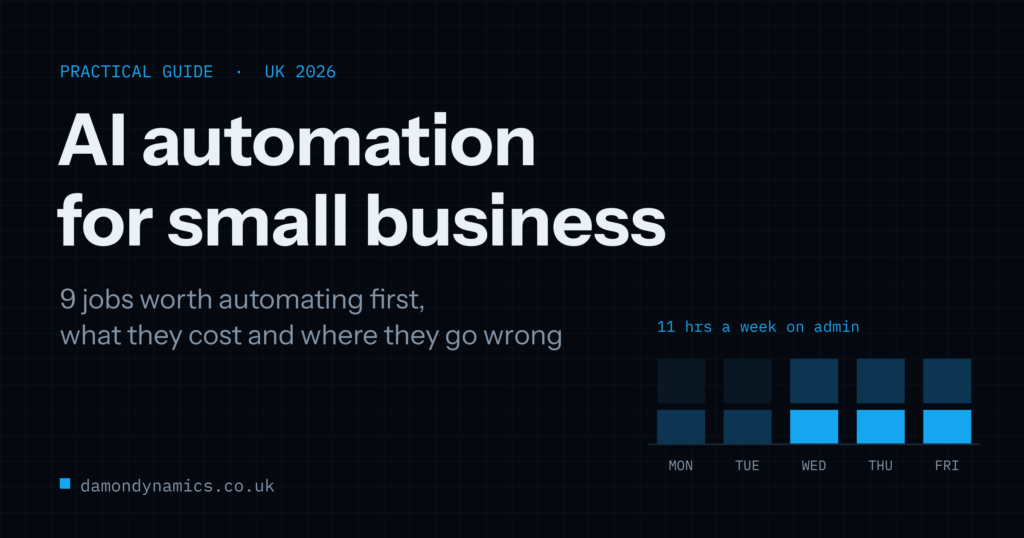
The prize is time. The Amex SME Business Barometer, a survey of 1,000 UK small and medium business owners published in July 2026, found owners spend an average of 11 hours a week on administrative or finance tasks, roughly six working days a month. They spend just over half that time on sales and business development. More than half said paperwork gets in the way of running the business.
This guide covers nine jobs worth automating first, what AI automation costs in 2026, how to pick the right one to start with, and the five ways these projects go wrong. We build these systems in Bradford for businesses across the UK, so the prices and timescales come from real projects rather than guesswork.
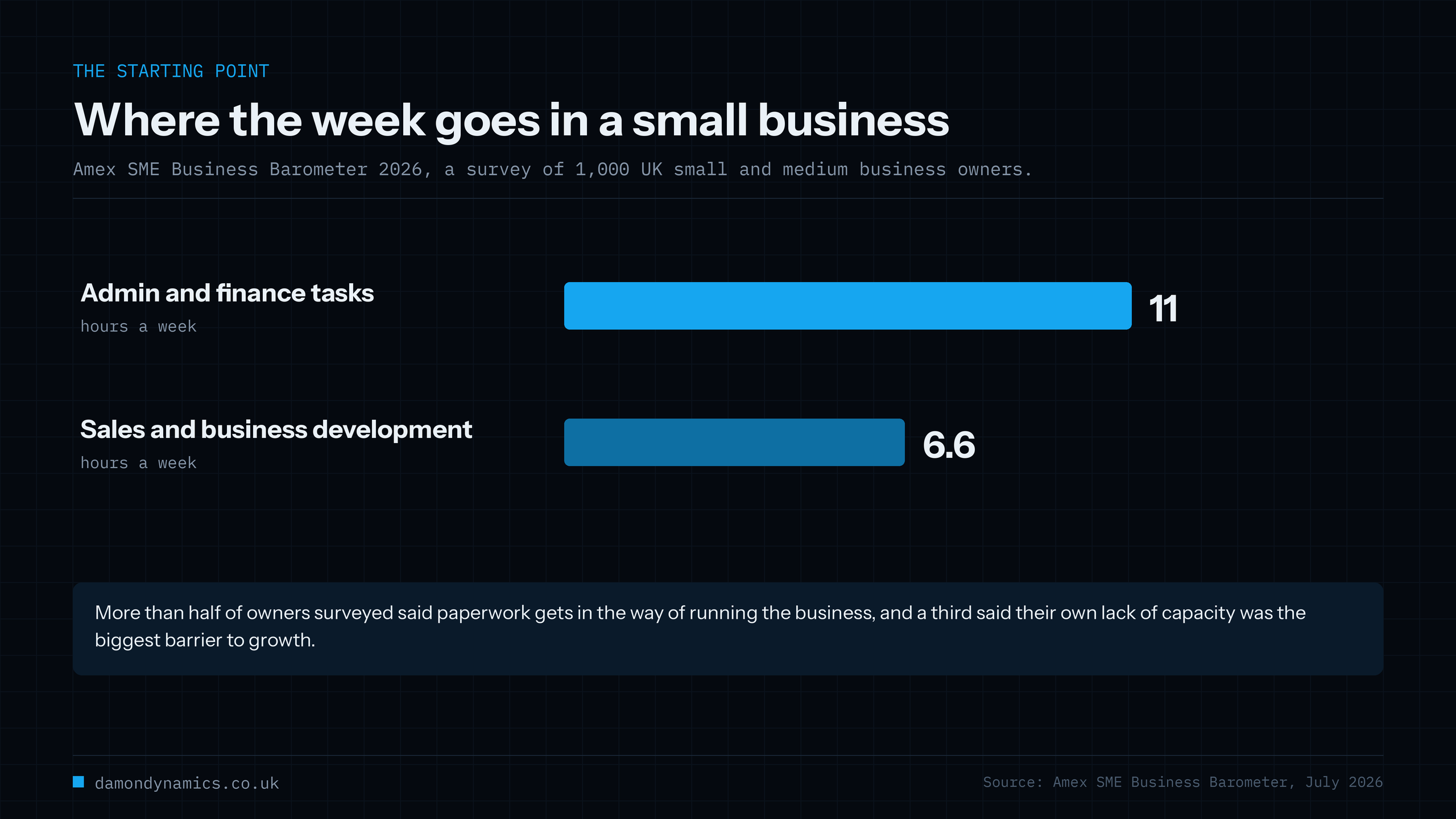
Table of Contents
What AI Automation for Small Business Actually Means
Ordinary automation follows rules you write down. When an invoice is 14 days overdue, send this email. It has been around for years and it works, as long as everything arrives in a tidy, predictable shape.
AI automation adds the missing piece: judgement over messy input. It can read an email written in plain English, work out what the customer is asking for, pull out the dates and the details, draft a sensible reply in your tone, and flag the ones a person needs to look at.
The best setups use both. Rules do the routing and the maths, because rules are cheap and predictable. The AI handles the messy human bits. A person approves anything that goes out with your name on it.
It is worth being clear about what AI automation is not. It is not an AI employee that runs your business while you sleep, and it is not a single tool you buy. It is a set of small, boring jobs done reliably, over and over, so you can spend your week on the work that earns money.
9 Jobs Worth Automating First
These are the nine AI automation jobs we get asked for most, in the rough order they pay back.
1. Answering the same customer questions
Opening hours, returns, delivery, eligibility, parking. An assistant trained on your own documents answers these day and night and links to the page the answer came from. Typically saves 3 to 6 hours a week in a busy service business and catches enquiries that arrive at 10pm. Our AI chatbot cost guide covers the pricing for this one in detail.
2. Turning enquiries into quotes
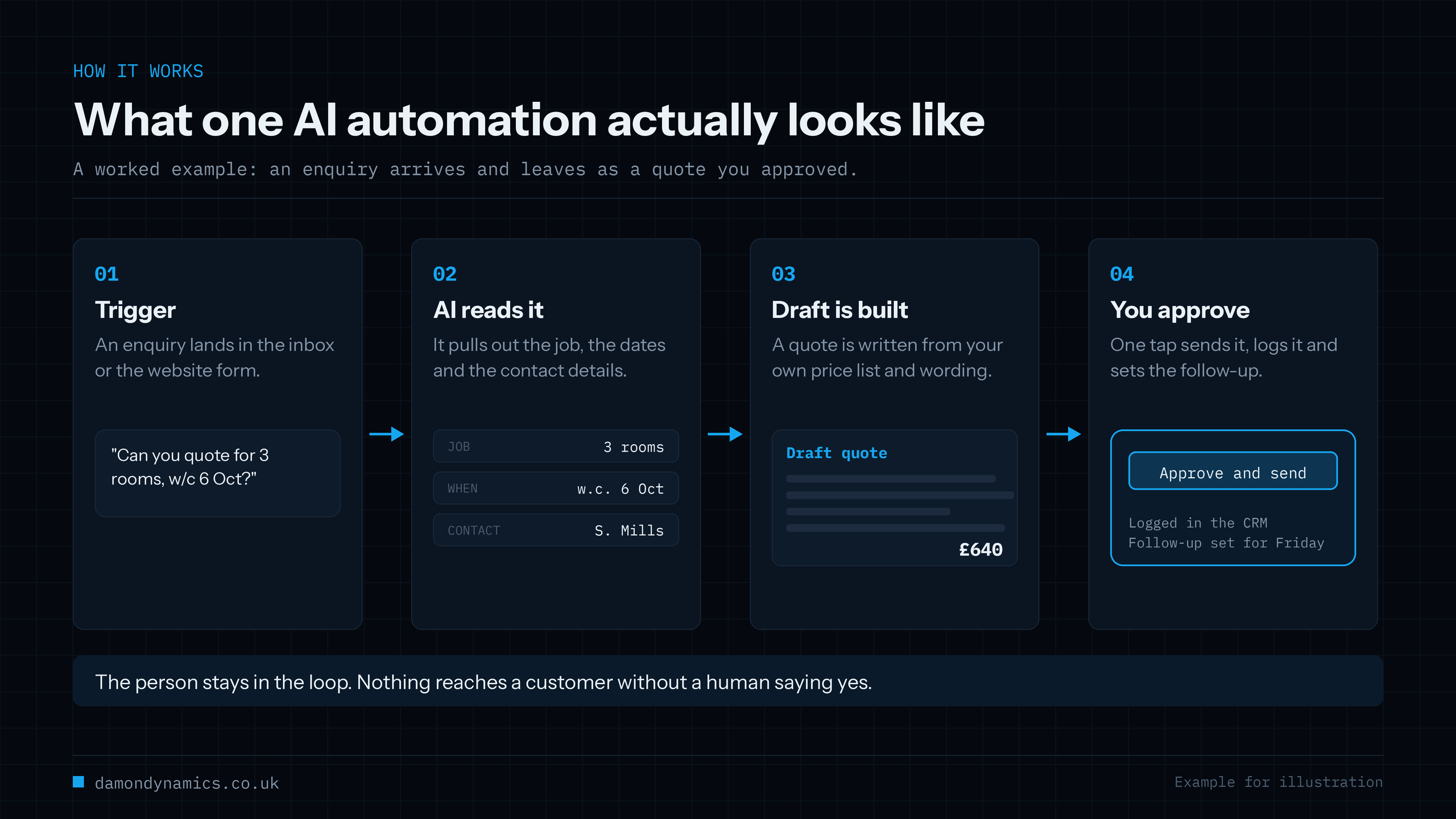
An enquiry arrives, the system pulls out what the customer wants, builds a draft quote from your own price list and wording, and puts it in front of you to approve. Saves 20 to 40 minutes per quote, and quotes that go out the same day win more often than quotes that go out next week.
3. Chasing invoices and payments
Polite, escalating reminders that stop when payment arrives, with a summary of who owes what each Monday morning. This is the automation that pays for itself fastest, because it improves cash flow rather than just saving time. Keep the tone yours: automated chasing that sounds like a debt collector costs you customers.
4. Booking confirmations and no-show reminders
Confirmation when the booking is made, a reminder the day before, a rebooking link if they cancel. Clinics, salons, garages and trades see the clearest return here, because every no-show is a wasted slot you have already paid for.
5. Getting data off documents
Invoices, delivery notes, timesheets, application forms. The AI reads the document, pulls out the fields you care about, and drops them into a spreadsheet or your accounts system. The savings are big, but so is the cost of a wrong number, so this one needs a checking step for anything unusual.
6. Writing up meetings and calls
Recording, transcript, summary, actions, and a draft follow-up email. For anyone whose day is mostly calls, this is an hour a day back. Tell people they are being recorded, every time, without exception.
7. Monthly reports
The report you rebuild by hand every month, assembled from your own numbers and written up in your usual format, ready for you to check. Two days of dread becomes twenty minutes of reading. Reports are also a safe place to start, because a mistake gets caught internally rather than by a customer.
8. Triaging the shared inbox
Sorting what arrives into urgent, sales, supplier and noise, routing each one to the right person and drafting the easy replies. Useful once you are past about 30 emails a day. Below that, the sorting takes longer to set up than it saves.
9. Keeping your listings and content current
Turning one piece of content into the versions you need for your website, your Google profile and social media, with you approving each one. Modest time savings, but it keeps the shop window from going stale, which is the thing most small businesses quietly let slip.
What AI Automation Costs in the UK
The AI automation prices below are ex VAT and reflect typical UK pricing in 2026.
| Approach | Setup cost | Monthly cost | Best for |
|---|---|---|---|
| Off-the-shelf tools you set up yourself | £0 to £300 | £0 to £50 | One simple, tidy workflow |
| Someone sets those tools up for you | £300 to £2,000 | £30 to £150 | Standard jobs, live in a week |
| Custom automation, one workflow | £1,500 to £6,000 | £10 to £100 | Your own documents, your own rules |
| Custom, several systems joined up | £6,000 to £15,000 | £50 to £300 | Quotes, CRM, accounts and email together |
| Enterprise or regulated | £15,000 to £50,000+ | £300+ | Audit trails and strict compliance |
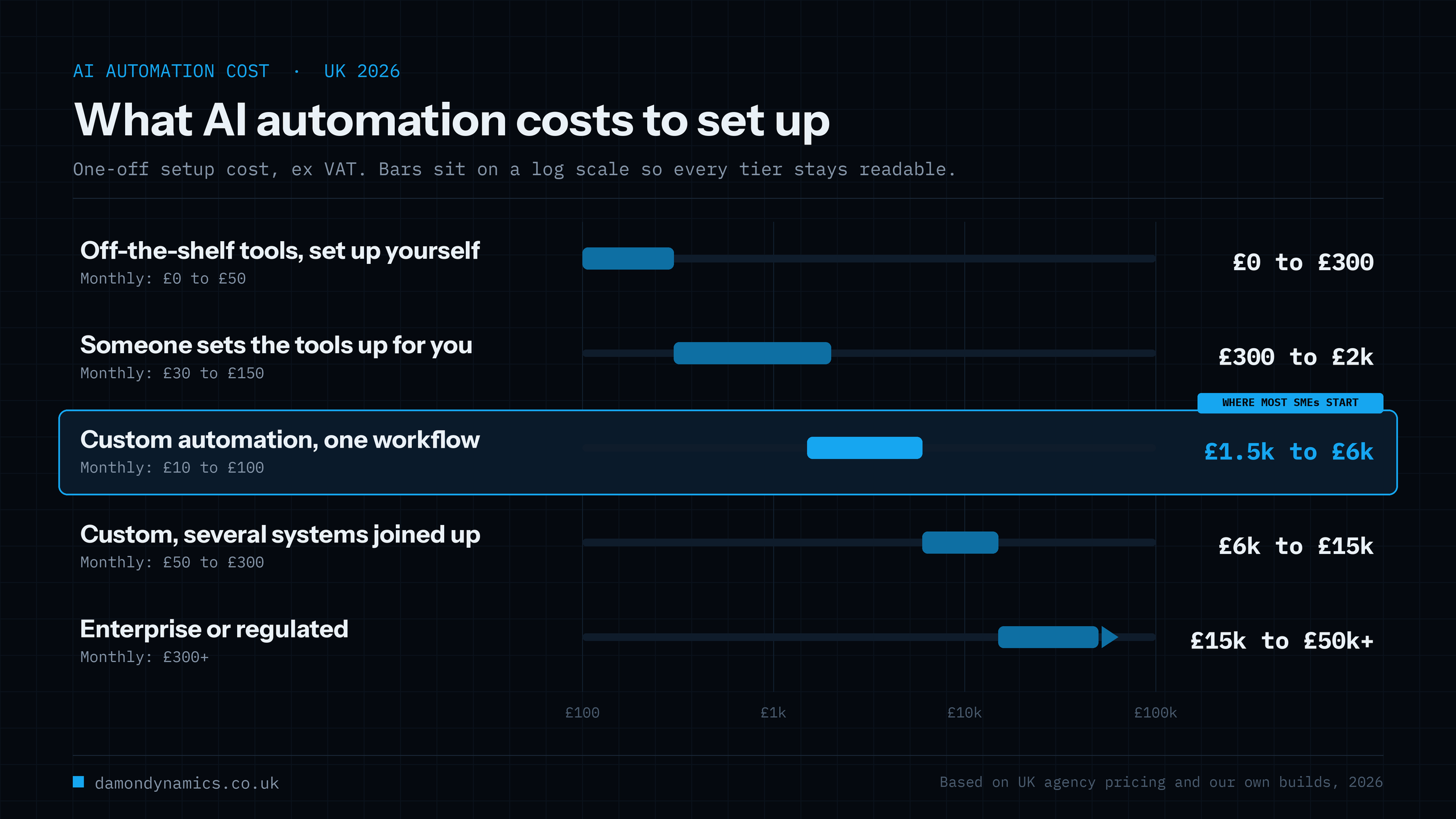
Most small businesses start in the middle band. Below it, you are limited to whatever the tool can do out of the box. Above it, you are paying for the work of connecting systems that were never designed to talk to each other.
Running costs are usually small and often surprise people. The AI itself costs pennies per job, because these tasks are short. Most of the monthly figure is hosting and the optional support plan that keeps things fixed when a supplier changes a form or a price list moves. Ask any supplier to quote the monthly cost at double your current volume, so you know what success costs before you get there.
Two things drive the price more than anything else. The number of systems involved, because each connection adds build and testing time. And how tidy your current process is, because nobody can automate a process that only exists in someone’s head.
How to Pick Your First AI Automation
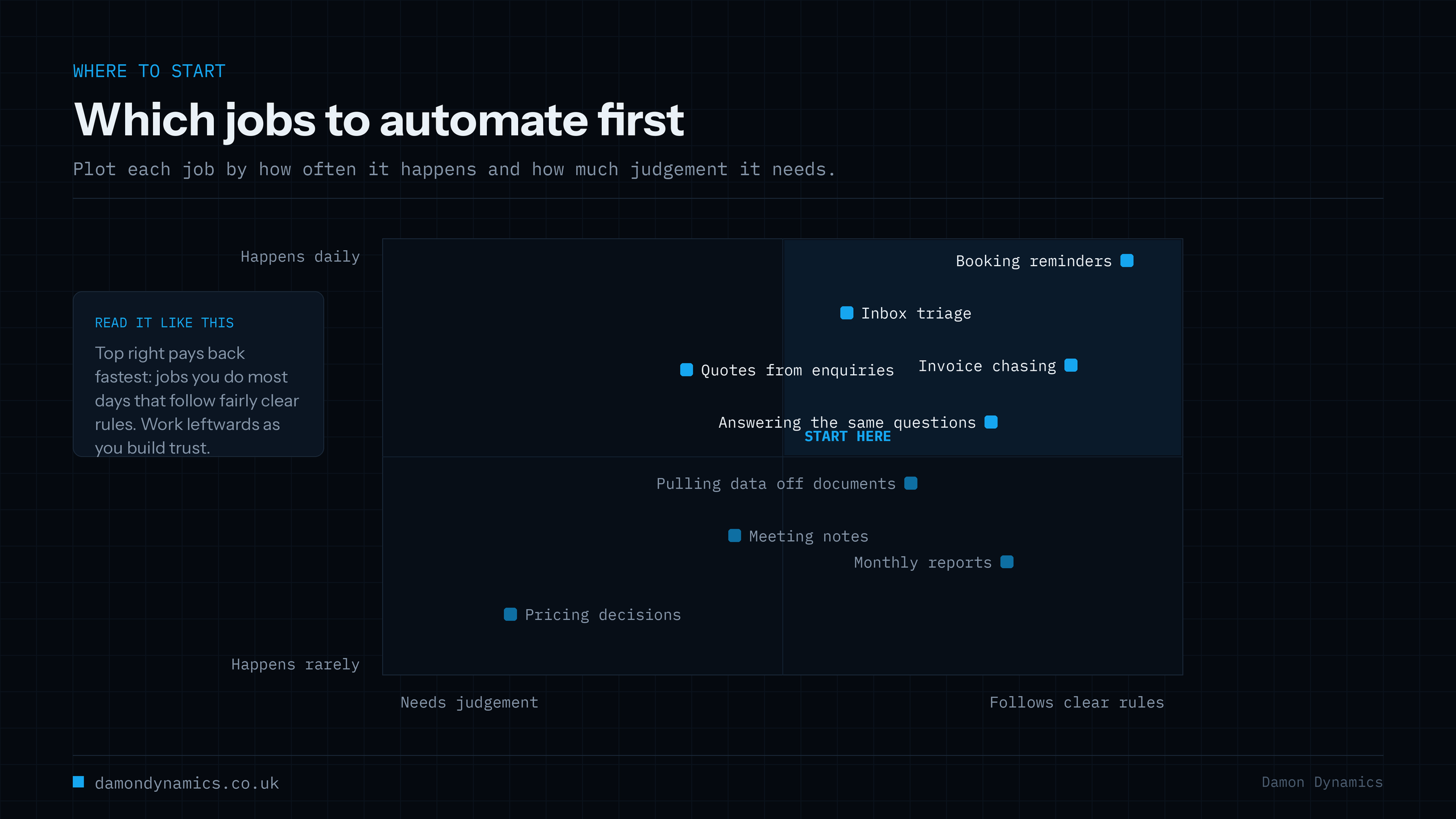
Most AI automation projects fail because the wrong job went first. Score each candidate out of 5 on four questions, then start with the highest total.
- How often does it happen? Daily beats monthly. Frequency is what turns minutes into hours.
- How clear are the rules? If you can explain the job to a new starter in five minutes, it is a good candidate.
- What does a mistake cost? A wrong internal report is a shrug. A wrong price to a customer is a problem. Start where mistakes are cheap.
- How much do you hate it? Not scientific, but the job you dread is the one you will actually maintain.
Then do the sums. If a job takes 5 hours a week and automation removes 70% of it, that is 3.5 hours back. At £20 an hour of your time, it is roughly £290 a month. A £3,000 build paying back £290 a month covers itself in about ten months, sooner if it also wins you work you were missing.
One last rule: automate one thing, properly, and live with it for a month before adding the next. The businesses that get the most from AI automation are the ones that finished the first project.
A Worked Example: One Week, One Workflow
Here is what a first AI automation project looks like in practice, using round numbers you can swap for your own.
A six-person plumbing firm gets around 40 enquiries a week by email and web form. Someone reads each one, works out what is being asked, checks the diary and types a quote. It takes about 12 minutes each, so roughly 8 hours a week, and quotes often go out two days late because the work happens in the evening.
The automation reads each enquiry, pulls out the job, the address and the dates, drafts a quote from the firm’s own price list, and puts it in a queue for approval on a phone. The owner reads it, taps approve, and it sends.
Quotes now go out in minutes rather than days. The typing drops from 8 hours a week to about 2. The build cost £3,500 and runs for under £30 a month. If the faster turnaround wins even one extra job a month, it has paid for itself before the time savings are counted.
Nothing in that example is clever, and that is rather the point. Most first AI automation projects look exactly like this.
5 Ways AI Automation Goes Wrong
- Automating a broken process. If the process is a mess, automation gives you a faster mess. Fix the steps first, on paper, then automate them.
- No human check where it matters. Anything that quotes a price, promises a date or goes to a customer needs approval until you have watched it behave for weeks.
- Tool sprawl. Six subscriptions, each doing one thing, none of them talking to each other, and nobody sure which one sent that email. Fewer, better connected pieces win.
- No owner. Automations drift when prices change or forms move. Somebody has to read the logs and fix the small breaks, about an hour a week.
- Forgetting the data rules. If personal data passes through it, UK GDPR applies to the automation the same as it does to your filing cabinet.
The UK Rules You Need to Know
If your AI automation touches customer names, contact details, health information or payment data, you need to know where that data goes and who processes it. The ICO’s guidance on artificial intelligence sets out what is expected, and it is written for ordinary businesses rather than lawyers.
In practice, four things cover most small businesses. Update your privacy notice so it says AI tools are used and what for. Check where your provider processes and stores data, and whether it trains on your inputs. Keep a human decision in anything that significantly affects a person, such as credit, hiring or eligibility. Write down what you decided and why, because being able to show your reasoning is half of compliance.
None of this is heavy, but it is far cheaper to do at the start than to retrofit after a complaint.
Off-the-Shelf Tools or a Custom Build?
Tools like Zapier, Make and n8n are genuinely good, and if your job is tidy and standard, use them. Connecting a form to a spreadsheet to an email does not need a developer.
Off-the-shelf tools start to hurt in three places, and this is usually the point where a custom AI automation earns its keep. When the work involves your own documents and wording, so a generic template will not do. When pricing scales with volume and your bill grows every time business is good. And when you need to know exactly why the system did something, which matters in regulated work.
A custom build costs more up front and far less per month, and it does exactly what your business does. Most of our AI automation projects are a mix: tools where tools are fine, custom code for the part that makes the business yours.
How We Build AI Automation at Damon Dynamics
We are an AI engineering company in Bradford, working with businesses in Leeds, across Yorkshire and remotely anywhere in the UK.
- A free 30-minute call. You describe the job that eats your week. We tell you honestly whether it is worth automating, and sometimes the answer is no.
- A fixed written quote. No day rates and no open-ended discovery.
- One workflow first. We build the single highest-value job as a fixed-price project, usually live within two weeks, so you see it working before spending more.
- You approve, the machine does the typing. Nothing goes to a customer without a person saying yes, unless you later decide otherwise.
- You talk to the engineer. Damon, who holds an MSc in Artificial Intelligence and Data Science from the University of Hull, builds every project himself. More about us here.
- Documented and handed over, so you are never locked in.
See the full list of what we build on our AI development services page, or look at what we have shipped on the products page.
Want to know which job to automate first? Book a free discovery call, tell us where your week goes, and we will come back within one working day with an honest view and a price range.
Want an assistant like this on your own website? Our AI chatbot is built from your own site, answers only from your information and costs £99 a month with no setup fee. You can try a free demo on your website first.
Frequently Asked Questions
What is AI automation in simple terms?
It is software that does repetitive work for you and can handle messy input, such as reading an email and pulling out the details. Ordinary automation follows fixed rules. AI automation copes when the input does not arrive in a tidy shape.
How much does AI automation cost for a small business?
Setting up off-the-shelf tools yourself costs between nothing and about £300, plus up to £50 a month. A custom automation built around your own documents and rules usually costs £1,500 to £6,000 to build and £10 to £100 a month to run.
Will AI automation replace my staff?
In a small business it usually does not. It removes the admin nobody wanted to do, so the same people spend more of the week on customers and the work that earns money. If you are hiring to keep up with paperwork, automation is the cheaper answer.
What should I automate first?
The job that happens most often, follows fairly clear rules, and where a mistake is cheap to fix. For most businesses that is answering repeat questions, chasing invoices or confirming bookings.
Is AI automation GDPR compliant?
It can be, but that depends on how it is built. You need to know what personal data it touches, where the provider processes it, how long anything is kept, and what your privacy notice says. Keep a person in the loop for decisions that significantly affect someone.
Can I use the tools I already pay for?
Often, yes. Accounting software, booking systems and CRMs have added AI features, and using what you already have is cheaper than building. A good supplier will check that first and tell you when you do not need them.
How long does an AI automation project take?
A single workflow is usually live within two weeks. Joining up several systems takes four to eight weeks, and most of that time goes on the other systems rather than the AI.
Not sure whether your slowest job is worth automating? Send a couple of lines through the contact page and we will tell you straight, even if the honest answer is that AI automation is not the fix.